

Connect your AI tools to Monta EV charging infrastructure
Connect Cursor, Claude, or ChatGPT to Monta and manage charging, parking, and payments using plain language—no API or coding knowledge required. Three MCP servers give your AI assistant direct access to Monta: one for the live API, one for product documentation, and one for a knowledge base of 250,000+ resolved answers. Ask questions, troubleshoot issues, or make changes right where you’re working.
Everything an integration needs
Three MCP servers, the tools your AI agent can call, and the knowledge to back it up.
- 3
- MCP servers
- API, knowledge base, and docs
- 250k+
- Resolved answers
- Searchable from your editor
- 5+
- AI clients
- Cursor, Claude, ChatGPT, and more
- 4
- Workflow prompts
- Common operations, one command
What the Model Context Protocol is
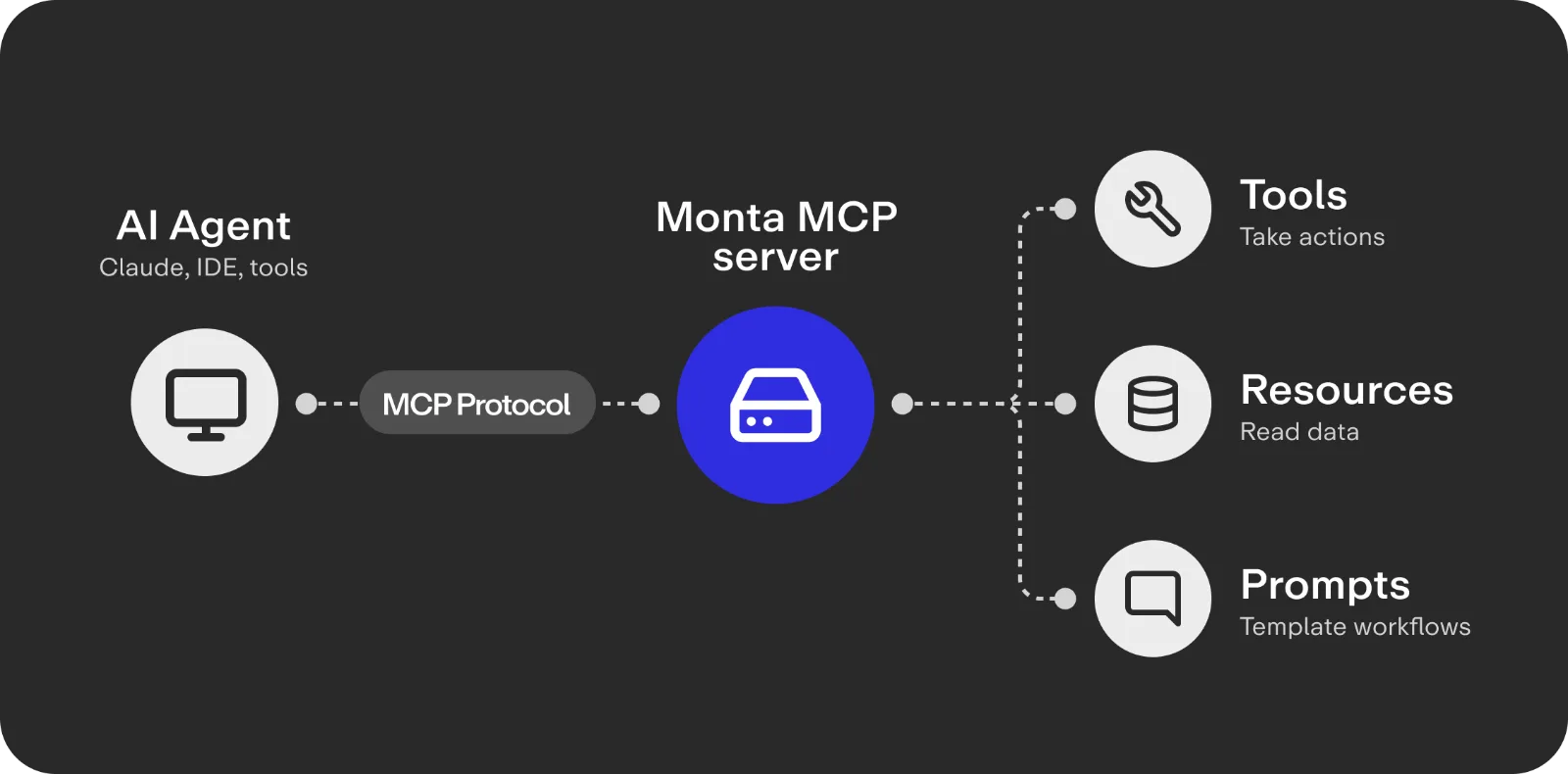
MCP is an open standard that lets AI tools call your systems in a consistent way, over JSON-RPC. Each Monta MCP server exposes three things an AI agent can use:
- tools to take actions
- resources to read data
- prompts that template common workflows.
Three servers, one infrastructure
Monta API MCP server
Call the live API straight from your editor. Tools are generated from the OpenAPI spec, so every endpoint is available and authentication is handled for you.
Knowledge base MCP server
Search 250,000+ resolved answers, help articles, product docs, and OCPP and OCPI specs. No authentication.
Docs MCP server
Pull the latest API reference and guides into your AI tool, so generated code matches the contract that is live today.
Add Monta to your AI editor
Drop the server into your client config and start asking questions against Monta. The same setup works in Cursor, Claude Desktop, Windsurf, and any HTTP-based MCP client. The knowledge base server needs no authentication.
{
  "mcpServers": {
    "monta-api": {
      "url": "https://partner-api-mcp.monta.app/mcp",
      "headers": {
        "X-Monta-Client-Id": "YOUR_CLIENT_ID",
        "X-Monta-Client-Secret": "YOUR_CLIENT_SECRET"
      }
    },
    "monta-knowledge": {
      "url": "https://knowledgebase-mcp.monta.app/mcp"
    }
  }
}
curl -N https://partner-api-mcp.monta.app/mcp \
-H "X-Monta-Client-Id: $MONTA_CLIENT_ID" \
-H "X-Monta-Client-Secret: $MONTA_CLIENT_SECRET" \
-H "Content-Type: application/json" \
-d '{"jsonrpc":"2.0","id":1,"method":"tools/list"}'From prompt to production
The work that decides the timeline, reading docs and writing boilerplate, moves into a conversation.
Query the API in plain language
Ask for chargers, teams, sessions, pricing, or wallet transactions and get structured data back without writing a request by hand.
Generate integration code that fits
Have your AI tool write requests against real endpoints and current schemas, so the code holds up against the contract that is live today.
Operate chargers from chat
Start and stop sessions, reboot a charger, or check statistics using prompts built for the most common operations.
Search the knowledge base instantly
Pull answers from 250,000+ resolved tickets, product docs, and OCPP and OCPI specs without leaving your editor.
FAQs
Do I need authentication to use the MCP servers?
The API server needs your client ID and secret. The knowledge base server is open and needs no authentication.
Which AI clients are supported?
Cursor, Claude Desktop, Windsurf, ChatGPT, and n8n, plus any client that speaks MCP over HTTP or SSE.
How are the API tools generated?
Tools are generated from Monta’s OpenAPI specification, so there is one tool per endpoint and they stay current as the API changes.
Which transport should I use?
Use streamable HTTP for stateful sessions. SSE is available for older clients that still need it.
What does the knowledge base cover?
Help articles, 250,000+ resolved support answers, product docs, release notes, and OCPP and OCPI standards, refreshed weekly.
Is this separate from the Monta API itself?
No. The MCP servers sit on top of the same API and docs and make them available to AI tools. You can still use the API directly.