





For: charge point operators (CPOs) and account admins managing charging stations in Monta Hub.
OCPP (Open Charge Point Protocol) self-heal is a background service that watches your charging stations and restarts the ones that get stuck. If a charging station stays Unavailable or Faulted for an hour while it is still connected to Monta, Monta sends it a hard reset. Many software faults clear on restart, so the charging station is back in service without anyone having to notice the problem or send a technician.
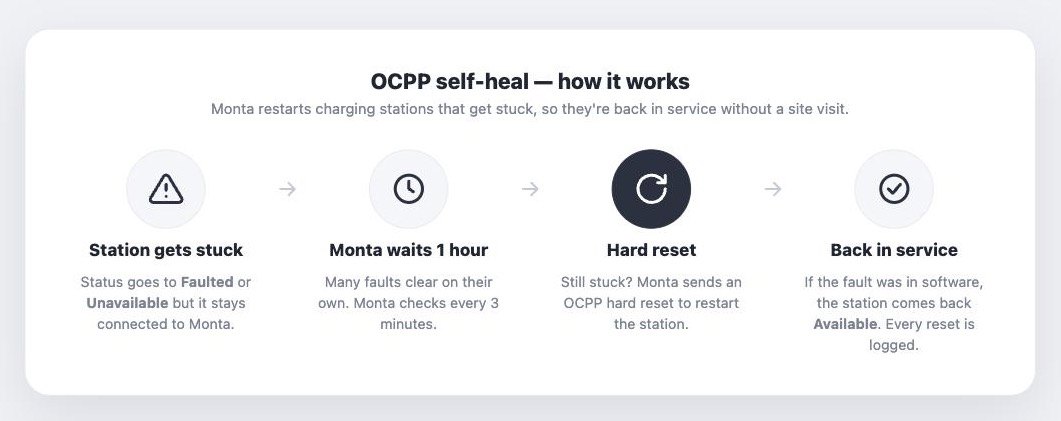
At a glance
How does OCPP self-heal work?
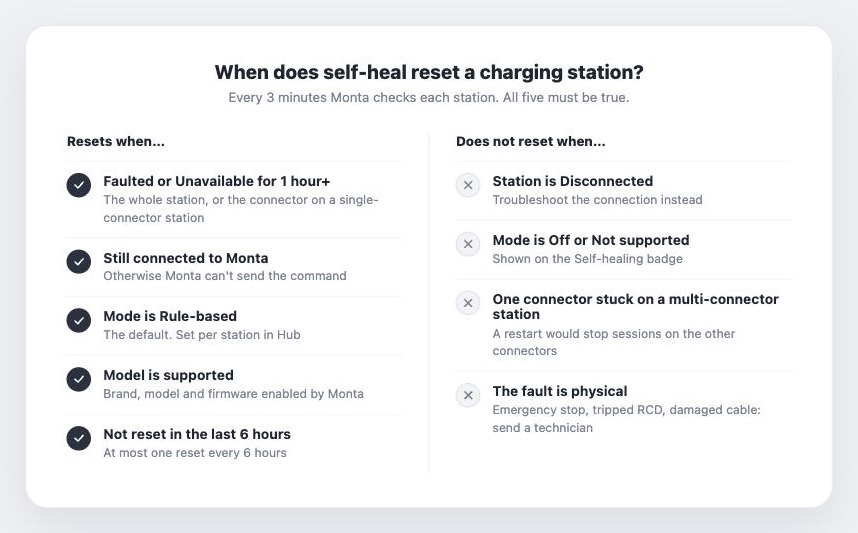
Every 3 minutes, Monta looks for charging stations that meet all of these conditions:
- The status has been Unavailable or Faulted for at least 1 hour.
- The charging station is still connected to Monta, so it can receive commands.
- The self-healing mode for the charging station is Rule-based.
- Self-heal is supported for the charging station’s brand, model and firmware version.
- Monta has not self-healed the charging station in the last 6 hours.
When all conditions are met, Monta sends an OCPP hard reset and records the event in the recovery history.
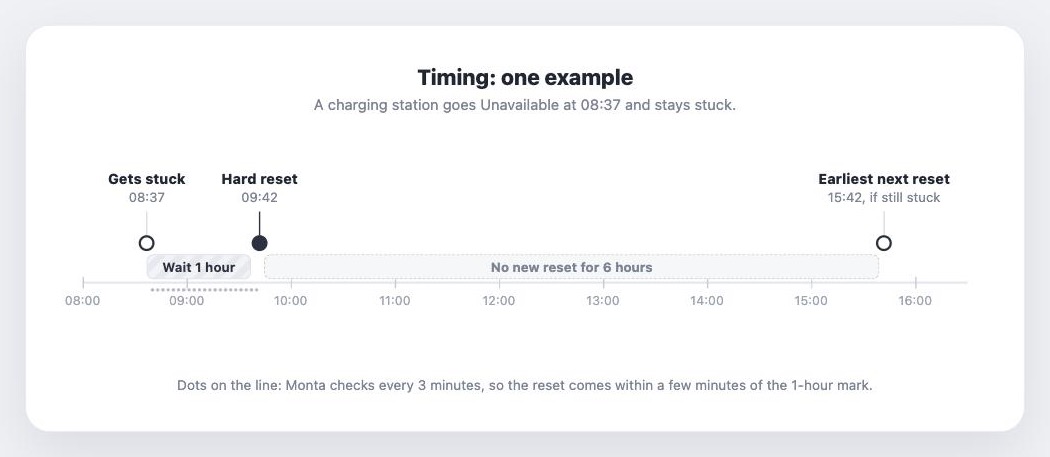
Example: a charging station goes Unavailable at 08:37. At 09:37 it has been stuck for an hour, and the next check, a few minutes later, sends the hard reset. The recovery history then shows the reset at 09:42 with “Stuck since 08:37”. If the charging station is still stuck after the restart, Monta will not reset it again before 15:42.
Single-connector and multi-connector charging stations
- Single-connectorcharging stations: Monta checks both the charging station and its connector. If either one is stuck, the charging station is reset.
- Multi-connectorcharging stations: Monta only checks the status of the whole charging station (connectorId 0). A single stuck connector does not trigger a reset, because restarting the charging station would also stop sessions on the other connectors.
See self-healing for a charging station in Monta Hub
- Open the EVSE in Monta Hub.
- Go to the Integration tab and select Self-healing.
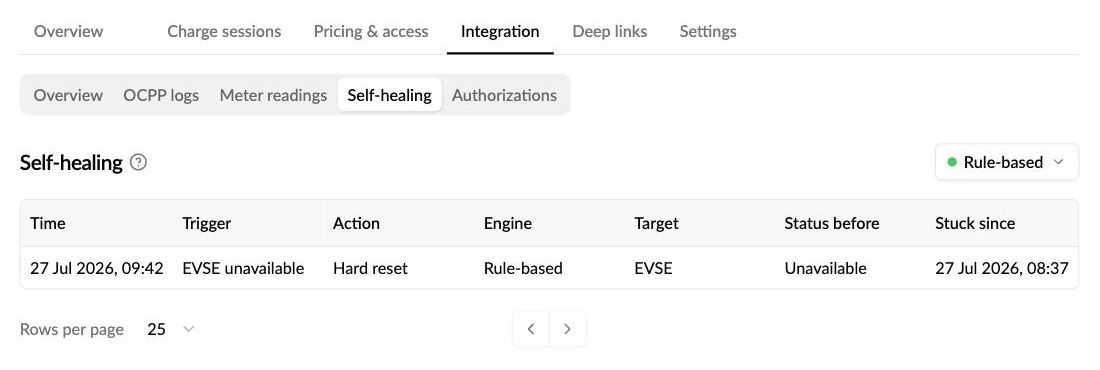
The button in the top right shows the current mode. The table below lists every automatic recovery, newest first:
The current mode is also shown as a badge under Self-healing in the details panel on the right of every EVSE page. The reset itself also appears in the charging station’s OCPP****logs (Integration > OCPP logs).
The Self-healing tab is only shown for charging stations connected to Monta over OCPP. Charging stations that reach Monta through roaming (OCPI) do not have self-healing.
Change the self-healing mode
- On the Self-healing tab, click the mode button in the top right (for example Rule-based).
- Choose a mode and click Save.
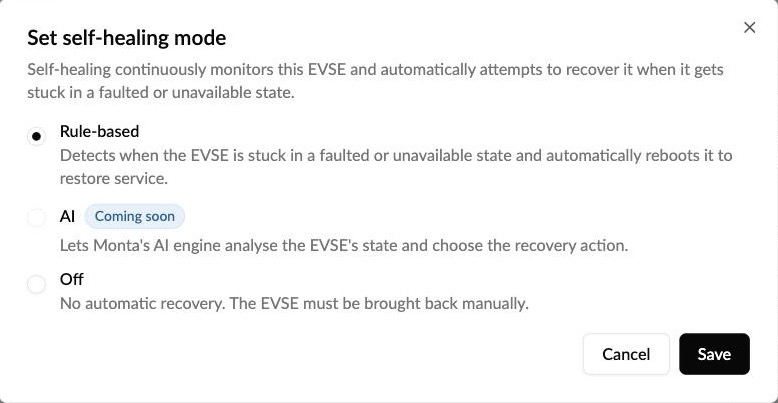
You need permission to edit the EVSE to change the mode. Members with view-only access can see the mode and the recovery history, but cannot change them.
When to turn it off: for example while a technician is working on the charging station, or if the charging station is used in a setup where an unplanned restart would cause problems. Remember to turn it back on afterwards.
What the self-healing badge means
- Rule-based: self-heal is active.
- AI: the charging station is set to the AI engine, which is not live yet.
- Off: self-heal is turned off for this charging station.
- Not supported: Monta does not support self-heal for this brand, model or firmware version, so the mode can’t be changed. Contact Monta Support if you think a model should be supported.
- Unknown: Monta could not read the self-heal status for this charging station. Contact Monta Support if this persists.
When does self-heal not run?
- The charging station is Disconnected. Monta can’t send commands to a charging station that isn’t connected. Follow How do I troubleshoot a disconnected charge point? instead.
- The mode is Off, or the badge shows Not supported.
- Monta already reset it in the last 6 hours. If a charging station is still stuck after a reset, the next attempt comes 6 hours later at the earliest.
- Only oneconnectoris stuck on a multi-connector charging station and the charging station as a whole is fine.
- The status is not Unavailable or Faulted, for example a connector that shows Charging but delivers no energy.
What is a hard reset?
A hard reset is an OCPP command that restarts all of the charging station’s hardware, much like switching it off and on again. The charging station does not have to finish ongoing sessions gracefully first, and data it had queued may be lost. The OCPP specification describes it as a last resort for a charging station that isn’t working correctly.
That’s why Monta waits a full hour before resetting, and resets the same charging station at most once every 6 hours. A charging station that is Unavailable or Faulted normally has no active session, but if a session is stuck, it is stopped by the restart.
What about faults that self-heal can’t fix?
A restart can’t fix physical problems such as a pressed emergency stop button, a tripped RCD or fuse, or a damaged cable. Send a qualified technician. Once the fault is cleared, the charging station returns to Available by itself.
Tip: check the recovery history regularly. If the same charging station shows a reset every 6 hours, the restart isn’t solving the problem. That usually points to a hardware or firmware issue that needs a technician or a firmware update.
For software faults that persist after self-heal has run, use the Reboot charging station remote action, or open Monta Control to send a manual reset and review the OCPP logs.
Frequently asked questions
Will I get a notification when self-heal resets a charging station? Not yet. Notifications for self-heal activity are planned. Until then, check the Self-healing tab on the EVSE.
Can I change the 1-hour or 6-hour timings? No. They are the same for all charging stations.
Can I turn self-heal on for a brand that shows Not supported? No. Monta decides which brands, models and firmware versions support self-heal. Contact Monta Support if you’d like a model to be considered.